
Blog
Best Lightweight Laptop for Students and Remote Work: Why the M1 MacBook Air Still Wins in 2026

Your laptop dies before your afternoon classes end. It’s heavy in your bag, the fan whines during video calls, and it stutters the moment you open a second app alongside Zoom.
Most budget laptops force you to choose between battery life, weight, and speed. You shouldn’t have to.
Quick Answer / TL;DR: The best lightweight laptop for students and remote workers in 2026 is still the Apple MacBook Air 13″ M1 — it delivers up to 18 hours of battery, a fanless silent design, and desktop-class performance from the M1 chip at $880. No Windows ultrabook at this price matches its battery-to-weight-to-speed ratio.
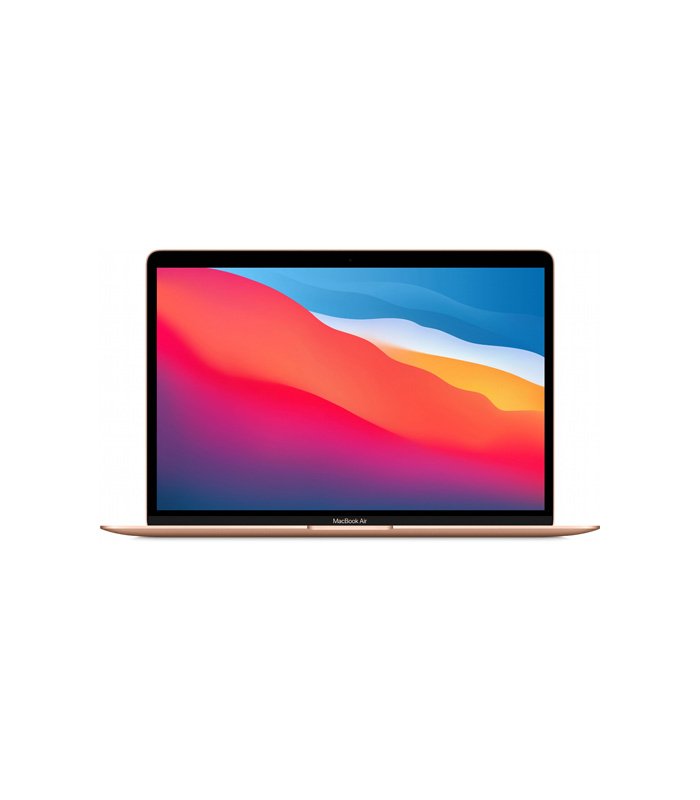
Featured Solution: Apple MacBook Air 13″ M1
Best For: Students, remote professionals, and travelers who need all-day battery in a bag-friendly form factor
Why We Recommend It: The M1 chip delivers fast, silent, fanless performance with up to 18 hours of battery life — at $880, nothing this light works this long.🛒 View Apple MacBook Air 13″ M1 Details & Real-Time Pricing on SmartBuyGadgets
Why the M1 Chip Changed the Budget Laptop Math
Apple’s M1 combines an 8-core CPU and up to 8-core GPU on one chip, sharing unified memory. That architecture eliminates the bottleneck between processor and RAM that slows traditional laptops.
The practical outcome: apps open instantly, 20+ browser tabs don’t choke it, and it does all this without a fan — because it barely generates heat.
Battery Life That Survives a Full Day
Apple rates the Air M1 at up to 18 hours. In real mixed use — docs, browsing, video calls — students routinely get through a full campus day plus an evening study session on one charge.
Compare that to typical $800 Windows ultrabooks that manage 6–8 hours and need a charger by 2pm.
Light Enough to Forget It’s in Your Bag
The wedge-shaped aluminum chassis is genuinely portable, and the 13.3″ Retina display with True Tone stays sharp and color-accurate for photo edits, presentations, and late-night reading.
When you’re commuting between classes or coworking spaces, the Apple MacBook Air 13 M1 disappears into a backpack in a way 15-inch machines never will.
How It Compares: The Three Specs That Matter
| Criteria | MacBook Air 13″ M1 | Typical $800 Windows Ultrabook | Why It Matters |
|---|---|---|---|
| Battery life | Up to 18 hours | 6–9 hours | One charge covers a full day of classes or meetings |
| Noise & heat | Fanless, silent | Fan-cooled, audible under load | Silence during lectures, calls, and libraries |
| Performance | M1 8-core CPU, unified memory | i5-class CPU, separate RAM | Faster app launches and smoother multitasking |
Configuration options include 8GB–16GB unified memory and SSD storage up to 2TB, in Gold, Silver, or Space Gray. macOS receives the latest updates and includes free versions of Pages, Numbers, and Keynote — no Office subscription required to start.
Who It’s For
Students writing papers, professionals living in browsers and video calls, and creatives doing light photo or audio editing will find the M1 Air more than enough.
If you edit 4K video daily or need Windows-only engineering software, step up to a MacBook Pro or a dedicated workstation instead. For everyone else, the MacBook Air M1 at $880 is the best value in lightweight computing.
SmartBuyGadgets ships to the USA, Canada, and UK within 72 hours, with installment payment options available at checkout.
Frequently Asked Questions
Is the MacBook Air M1 still worth buying in 2026?
Yes. The M1 chip still outperforms most budget Windows laptops in everyday tasks, macOS continues to support it with updates, and at $880 it costs hundreds less than newer Air models while covering the same student and office workloads.
Can the MacBook Air M1 handle video calls and multitasking at the same time?
Comfortably. The M1’s unified memory architecture keeps Zoom or Teams running smoothly alongside documents, browser tabs, and Slack without fan noise — because there is no fan.
How much storage should I get for school or remote work?
256GB covers documents, apps, and cloud-synced files for most users. Choose 512GB or more if you store photo libraries or large project files locally; the Air M1 supports SSD options up to 2TB.